

Documents, sharing & tracking progress
Upload documents, message your team, and see exactly where things stand — all in one place, from your computer or your phone.
Upload documents
Submit files for any open request, right from your task list.
Message your team
Leave a comment on any task — no email back-and-forth needed.
Track progress
See the status of every request at a glance, updated in real time.
Stay connected on mobile
Do all of the above from the Karbon for Clients app, on iOS or Android.
How to upload and submit a document
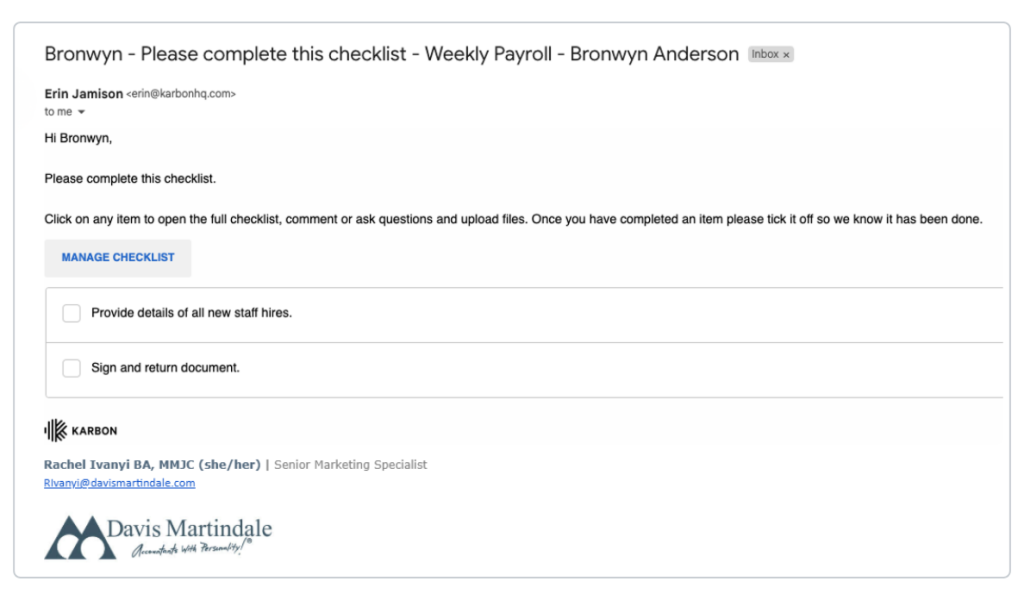
1. Open your email
Open the email from your accountant and click “Manage checklist”. This takes you straight to your task list.
2. Review your tasks
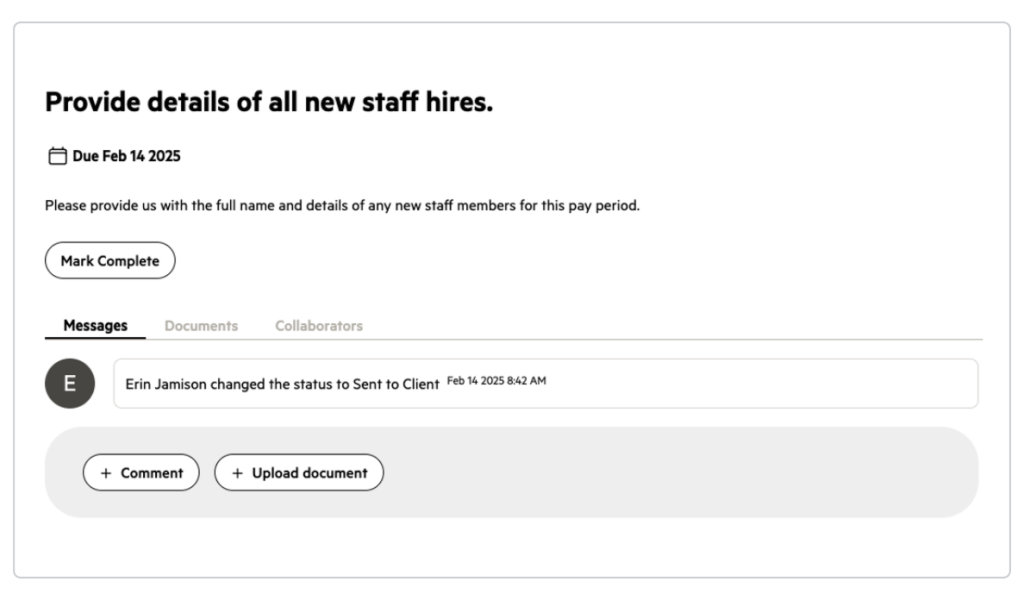
Review your task list to see what’s outstanding. Each task shows what’s needed and any relevant due date.
3. Go to “Documents”
Open the task, go to the “Documents” section, and upload your file. You can add a comment here too if you’d like to add context.
Alternatively, you can select “Upload document” directly in your message feed rather than navigating to the “Documents” section.
4. Mark as “Complete”
Once everything’s uploaded, click “Mark as complete” to let your team know you’re done. If anything’s missing, they’ll leave a comment or reopen the task.
Tracking your progress
Every task in your portal shows a status, so you always know where things stand without needing to ask.
Take it with you
The Karbon for Clients app gives you the same tasks, documents, and status updates from your phone — available on the App Store and Google Play.
Frequently Asked Questions
PDFs, Word documents, Excel files, and images are all supported, depending on what your accountant has requested.
Yes — each file can be up to 200 MB, with a combined limit of 50 MB per task. If a file's too large, try splitting it or contact us for help.
Once you mark a task as complete, your team is notified automatically. You don't need to follow up separately.
Open your task list at any time — each task shows a live status, so you can check progress without waiting on an email.
Contact our office and let us know or comment within the task to let us know directly.
Yes — the Karbon for Clients app supports uploading documents, messaging your team, and tracking status, just like the web portal.
Still have questions?
General questions
Reach out to our portal team directly.
Karbon support for your client portal
If you encounter any issues while using the portal or have questions about its functionality, Karbon Support is here to assist you.